 MOGA World
Ecommerce SOP Template: the 6 Procedures a Seller Should Write First
A blank SOP template gives you headings. You open it, type “Step 1” and stop, because the hard part is not the heading. It is the rule that goes under it: how late is late, how many returns is a pattern, when does a price change count. This article gives you six procedures with the rule already written, and a way to run them each week.
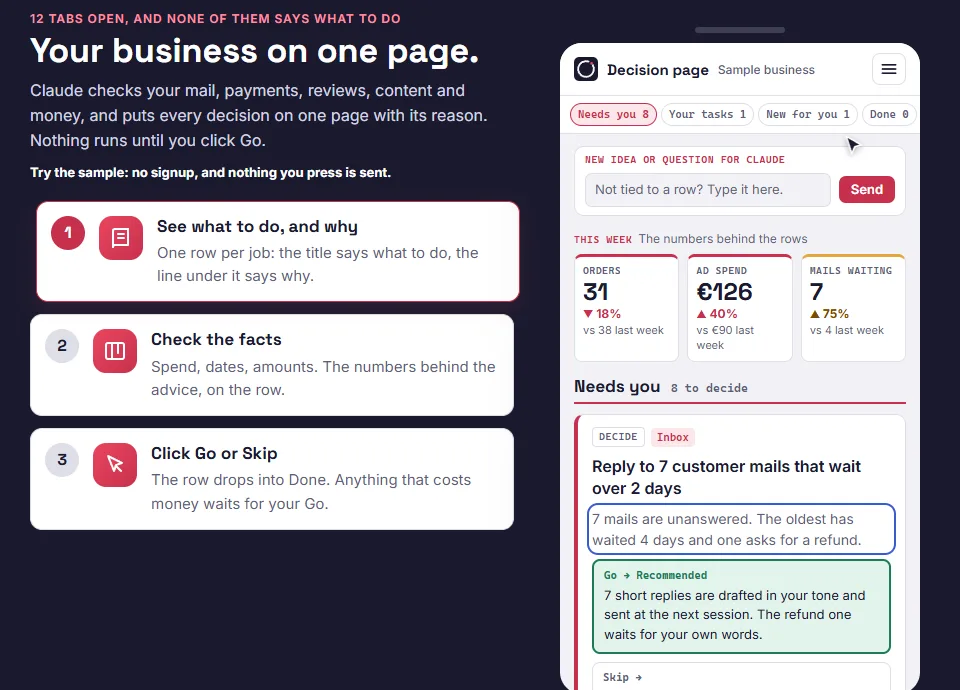
Short on time? The free sample page shows the stock check procedure from this article as a decision: See the free sample page
What an ecommerce SOP is
An ecommerce SOP (standard operating procedure) is a written, repeatable set of steps for one recurring job in your business, with a time limit and a clear point where the job counts as done. The useful ones also hold the one rule that decides the job, so you stop re-deciding it every week.
Most people who run their own online business work from memory. That works until a supplier is late in your best week, or someone else has to do the job. A procedure on a card with a due date works the same whoever opens it.
What every procedure holds
I use the same shape for every card on the Operations board. It is short on purpose.
- A verdict first. One line saying what you are looking for.
- The one rule or number. The thing that decides the job.
- What usually goes wrong. Written after it went wrong.
- A time limit in the title, such as “15 min max”. A weekly check stays weekly when you can see it is small.
- What done means, including the line “none this cycle” when nothing was found. A silent card cannot be told apart from a skipped one.
- Who acts: you by hand, a script, or a script that you approve before it goes live.

The 6 procedures
The numbers below come from the sample data on the board. They are invented, and the rules around them are the part to copy.
1. The stock check
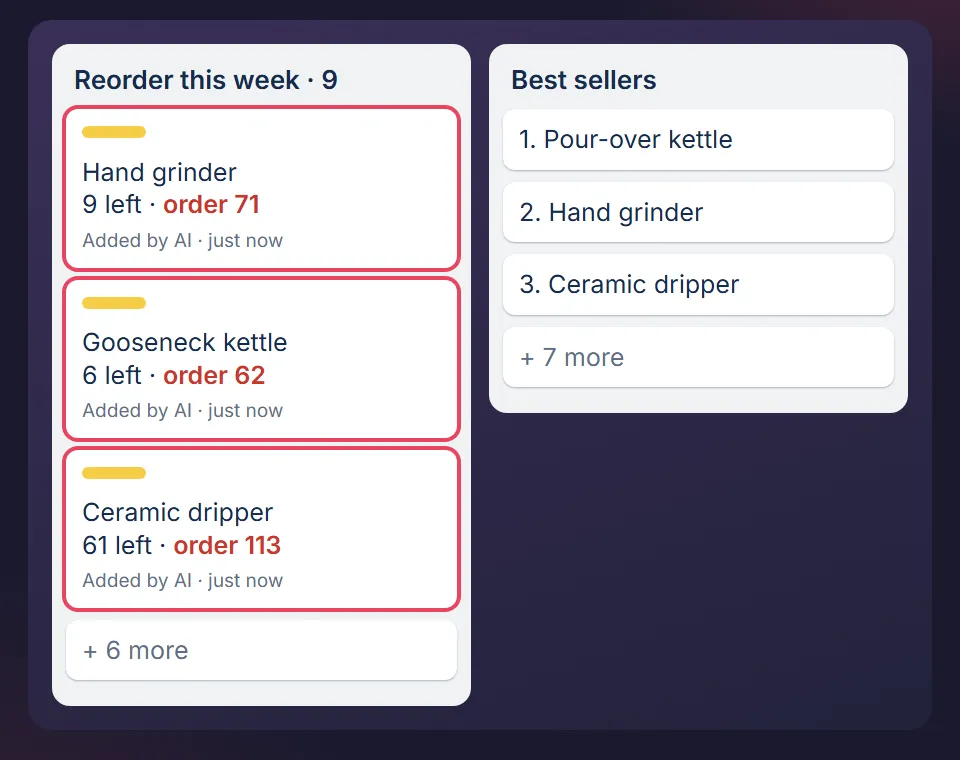
- The rule: reorder point = average units sold per day × supplier lead time in days × 1.5. In the sample, 6 a day × 21 days × 1.5 = 189 units. You order at 189, not at 50.
- What goes wrong: people use the lead time the supplier quoted instead of the last three real ones. A promo week gets treated as normal sales. Damaged or reserved units get counted as stock.
- Done means: a card per product that will run out before a delivery can arrive. The check detects, it never orders.
2. The supplier chase
- The rule: late is measured against the date the supplier confirmed, not the date you hoped for. Day 0 of the expected week, ask for a shipping date. 3 days past, ask what blocks it. 7 days past, ask for a revised date and whether a partial shipment is possible. 14 days past, log it on the supplier card.
- What goes wrong: “any update?” gets “we will check”. Ask for a specific item instead, like the container number and the sail date.
- Done means: every open order has a confirmed date in the future or a dated chase logged against it.
3. Receiving a delivery
- The rule: a shortage is only claimable for a short window and only with evidence. Photograph the cartons before opening. Count cartons against the delivery note and sign for the count you see. Count 3 random cartons, or all of them on a first order. Check 10 units against the listing.
- What goes wrong: a clean signature usually ends the claim. And landed cost (freight, duty, inbound handling) is guesswork if you work it out three months later.
- Done means: shortages reported within 48 hours with photos, landed cost per unit written down now.
If you do not physically receive stock (dropship, print on demand, a 3PL that receives for you), skip this one. Delete rules whose trigger you do not have.
4. The returns pattern review
- The rule: investigate a product when it has 3 or more returns in 30 days with the same stated reason, or a return rate more than double your own catalogue average. One card per pattern, never per return.
- What goes wrong: “not as described” is nearly always a size, colour or quantity error in the listing, not a quality problem. Damage on one product is usually packaging, not the carrier.
- Done means: each pattern has a card with a written prevention: the listing edit, packaging spec or order line that would have stopped the parcel coming back.
5. The listing spot check
- The rule: three listings a week beats all of them once a year. Check the main image, the title, then the attribute fields (size, weight, material, quantity). An empty attribute field is invisible to a filter.
- What goes wrong: attributes copied from the supplier sheet instead of the product. In the board's sample, a product listed at 40 cm measured 36 cm and caused months of “not as described” returns.
- Done means: three products checked on every channel they sell on. If a listing sells well, only fix a factual error.
6. The price and margin review
- The rule: check margin, not price. Contribution per unit = selling price minus landed cost minus marketplace fee minus shipping minus (return rate × cost of a return). Sample: 14.95 minus 5.00 minus 2.24 minus 2.60 minus 0.17 = EUR 4.94.
- What goes wrong: treating the supplier invoice as the cost. Price can stay the same while margin halves through fees, freight and returns.
- Done means: act when contribution has fallen more than 20 percent since the last review, and today when it is negative. Do not react to a competitor's price until you have checked that your own sales fell.
Why these six
Each one is a job where a miss costs real money within weeks: a stockout, a late container, a lost claim, a repeat return, a bad listing, a margin that quietly shrank. That is the filter. If a procedure would not cost you anything when skipped for a month, write it later.
Where an SOP lives so it gets done
A document in a folder gets read once. A card set to repeat comes back on its day. One rule from the board explains why: if a card has no due date it will not get done, because Trello does not nag about undated cards.
Recurring procedures never move to a Done list. They stay in one place and reset each cycle. Only one-off jobs, like a single order or a single listing fix, move across and close. Mixing the two is how a good board rots within a month.
Once the procedures run, the weekly business review template adds one check of the whole week: sales, margin, stock cover, open problems and cash.
What you need
- A free Trello account. The free plan is enough.
- One sitting to fill in your suppliers and your 10 best selling products. If you are past 90 minutes you are backfilling history instead of starting.
- Claude is optional. The procedures work by hand. If you want Claude to run the checks and write the cards, this article shows how.
Where it stops
- A procedure with a wrong rule only makes you wrong faster. The numbers here are samples. Replace them with yours.
- It does not tell you what to sell or how to price. It checks the business you already run.
- If you will not open the board twice a week, no template will help.
How I use it
I spent six years running ecommerce businesses. Every rule above was written after something went wrong, then rebuilt from scratch as a clean template with invented sample data, so nothing from those businesses is in it. How I run MOGA with the same method is on How MOGA is run.
Start with one procedure, free
The free sample page shows the stock check from this article as one decision, with its reason and a Go button. No signup, and nothing you press is sent. The free starter board, the Trello version with the stock check card in the same format as the paid boards, is the email step behind it.
Want all the procedures? They are in the packs.
MOGA World is independent and not affiliated with Anthropic or Atlassian. Sample businesses and numbers in this article are invented. Questions: stef@mogaworld.co