 MOGA World
Claude for a Small Business: the 5 Jobs It Takes Off an Online Seller
You do not need another AI demo that writes a poem about your product. You need Monday's stock check done before your coffee is cold, and the supplier you forgot to chase actually chased. This article covers that part: five weekly jobs Claude can read and write for a small online business, and the parts that stay with you.
What “Claude for a small business” means
Claude for a small business means using Claude, the AI assistant made by Anthropic, for the reading and writing part of running the business: checking numbers against your own rules, drafting replies and mails, and keeping track of what is due. It works best when it can read your business facts from files and your weekly jobs from a task board, so you stop explaining your business again in every chat. You stay the one who approves anything that costs money or goes out in your name.
One thing to know before you search further. Anthropic sells a package with almost the same name, Claude for Small Business, launched 13 May 2026: connectors and ready made workflows inside its Claude Cowork app, for tools like QuickBooks, PayPal, HubSpot and Google Workspace. Its examples lean towards admin and finance: payroll, closing the month, campaigns. This article is about something else: the weekly operating jobs of a business that sells physical products online. MOGA World is independent and not affiliated with Anthropic.
The setup: teach it once
Here is the problem most people hit first. You try Claude, it spots something useful, then the chat ends and it forgets all of it. So you explain your margins again. You start a notes file. It grows to 400 lines and half of it is no longer true.
The fix is to teach it once. Claude Code is a different Anthropic tool from Cowork, and it is the one this article uses. It runs as a chat window inside VS Code, a free editor app. There is no terminal. You give it a folder: one page that describes your business, plus one small file per fact or rule. Next to that sits a Trello board (a free task board app) where each card is one job with a checklist. Every session, Claude reads the folder, then the board, then does the work that is due.

The 5 jobs
The examples below come from sample sessions for invented businesses. The names and numbers are made up; the card names are the real ones from the boards.
1. The Monday stock check
- What Claude reads: your sellable stock for your 10 best selling products, the file that says how long each supplier really took on the last three deliveries, and the checklist on the stock check card.
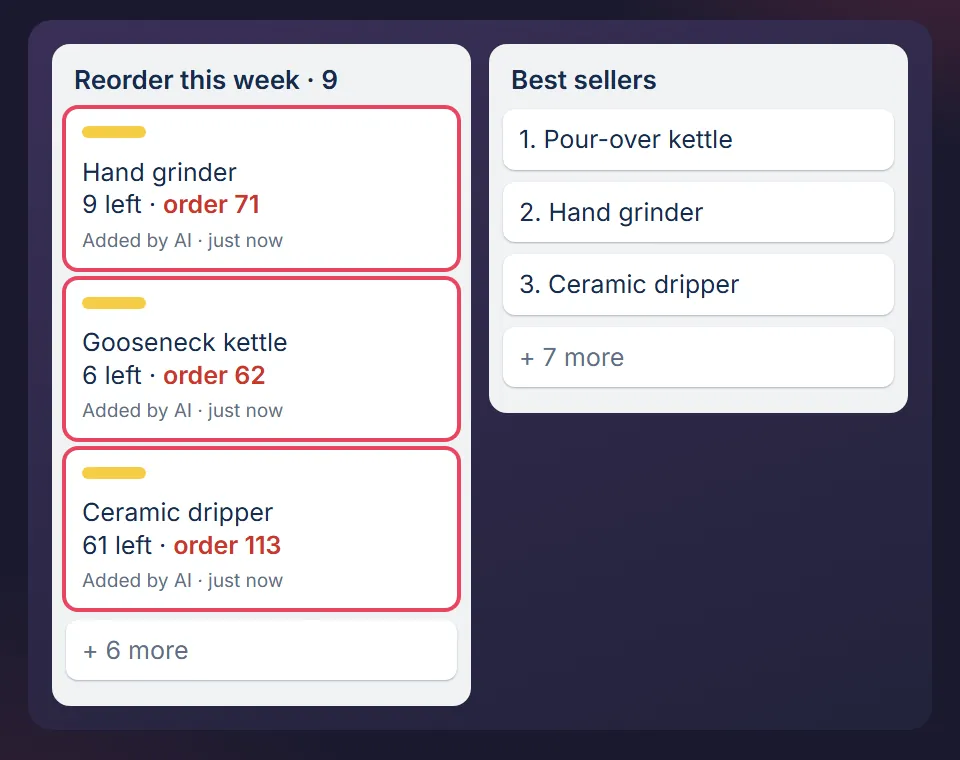
- What Claude writes: one card per product that will run out before a new delivery can arrive, with the days of stock left. It ticks the steps it ran and logs the run.
- Your part: deciding how many to order. It never orders.
The detail that matters: it uses the last three real delivery times, not the time your supplier quoted. And a blank or zero export counts as a failed read, not as good news. The card puts it plainly: “This card detects, it never orders. A detector that can also act will eventually act on a bad read.”
2. The discount question
- What Claude reads: the costs of the product, the marketplace fee, and your margin floor (the lowest margin you accept).
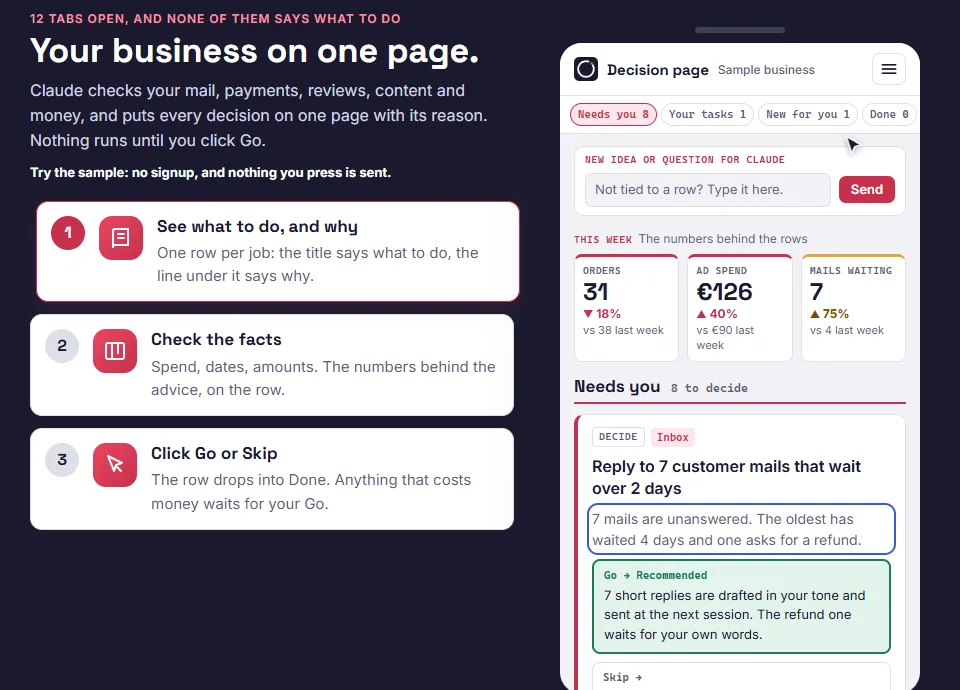
- What Claude writes: an answer on your decision page, a single page where every question that needs you sits as one row. In the sample: “Yes. Margin after the discount is 35 percent, above your 32 percent floor.”
- Your part: clicking Go on the price change. Every price change waits for your Go.
This is the job that saves you from the expensive mistake: a discount approved on a margin that forgot the marketplace fee.
3. Customer mails
- What Claude reads: the customer's message, your written rules (returns window, size advice, what you refund), and the Customer Support board.
- What Claude writes: a draft reply. Nothing goes out in your name without your OK.
- Your part: reading the draft and pressing send, then dragging the card.
The board does a second job here. A ticket you replied to moves to Waiting, and the card says who or what you are waiting on: the customer's photos, a supplier restock. When a fourth customer asks the same question, the tickets become one Pattern card. Four people asking which size to order is not four tickets. It is one product page that needs a size line.
4. The supplier chase
- What Claude reads: the orders you placed with suppliers that have not arrived yet, and the date each one was due, from the board.
- What Claude writes: the list of late ones and a draft chase mail for each.
- Your part: sending, or deciding to wait.
On the board this is a weekly card with a time box, “10 min max”. Chasing a supplier never feels urgent on any one day, which is exactly why it slips a week, then three.
5. What slipped this week
- What Claude reads: every board, for cards past their due date (a check that runs by itself every day), and the rows you answered on your decision page.
- What Claude writes: the overdue list, and the follow up on every row you clicked. Rows you answered get done and checked the next time you open Claude, not before.
- Your part: answering the rows. Go, Skip, or a sentence.
That loop is the whole system. Claude does the reading and the writing. Your part is a click, a sentence, or moving a card.

The rule underneath: it asks before money moves
When Claude read a value from your own pages or data and the change can be undone, it makes the change and tells you. When it is guessing, when money is spent or when something is sent in your name, it asks first. Changes to your live product pages wait for your Go as well.
Short answers on this: will Claude Code change prices or send mail without asking, and how it works with a Trello board.
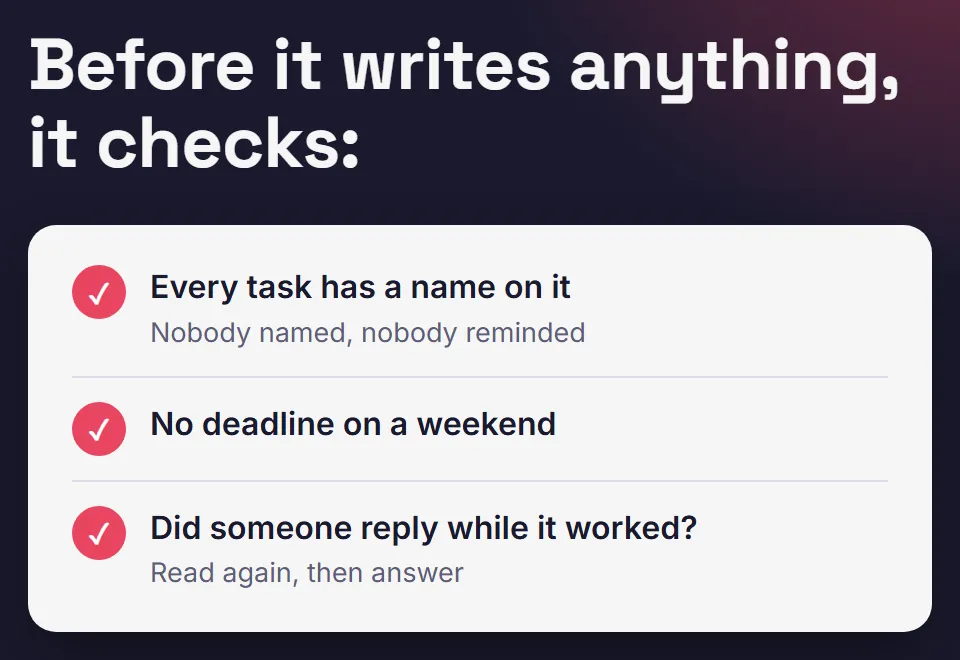
There is one more habit worth copying even if you build all of this yourself. When a rule gets broken twice, it becomes an automatic check that runs before anything goes out. You stop relying on remembering.
Claude for business: chat, a package, or a workspace
If you searched “Claude for business”, you probably met three different things under one name. They answer different questions.
| Option | Good for | Watch out for |
|---|---|---|
| A chat in the Claude app | One off writing: a product text, a reply, a summary | It does not carry your business from one chat to the next unless you set that up |
| Anthropic's Claude for Small Business package | Admin and finance work in tools like QuickBooks, PayPal and HubSpot | Check Anthropic's page for current plans and workflows |
| A workspace in Claude Code, plus task boards | Weekly operating jobs: stock, suppliers, customer mails, what slipped | Takes a setup session, and you need to open it a few times a week |
None of these is the right answer for everyone. If your week is mostly invoices and payroll, look at Anthropic's package first. If your week is stock, suppliers and customer mails, a workspace that remembers your rules fits better. That second one is what I build at MOGA.
What you need, and what it costs
- VS Code, a free editor app, with the Claude Code extension.
- A Claude plan that includes Claude Code. Claude Pro is about EUR 18 a month before VAT, paid to Anthropic.
- A free Trello account. The free plan is enough.
- One API key (an access code for apps) from your sales platform, such as Shopify, WooCommerce, Etsy, Amazon or bol.com. Nothing connects until you connect it.
With the MOGA workspace, setup takes about two hours, once: 30 minutes to get in, then 90 with Claude. You paste a link to your website or marketplace page, Claude drafts your setup from your public pages, marks every guess, and only asks what no page shows, like your margin floor.
Worried you need to code? You do not.
Already pay for ChatGPT? Claude vs ChatGPT for running an online business shows which jobs fit which tool.
Where it stops
Honest limits, so you do not buy the wrong thing:
- It does not run while you sleep. It is built to work with you, not without you.
- It will not tell you what to sell. It runs the week of a business that already sells.
- If you are not selling yet, there is nothing to teach it.
- If you will not open it twice a week, no setup will help.
How I use it
I spent six years running ecommerce businesses and built this setup for my own work first. Every rule in it was written after something went wrong. Then I rebuilt it from scratch as a clean template, with invented sample data, so nothing from those businesses is in it.
MOGA itself runs the same way. I type one word, Claude reads the inboxes and every board, does what it can alone, and puts what only I can decide on one page. The full setup, rules included, is on How MOGA is run.
One early tester, Stanley, an ecommerce seller who got the package free to test, wrote:
“This package has helped me a lot improving my current E-commerce Business with a nicely setup claude code workfolder with easy steps to implement.”
Start with one free board
The easiest way to see if this fits your week is the free sample page: one page of decisions with sample data, nothing sent, no signup. No Claude needed to open it. The free starter board, the Trello version in the same card format as the paid boards, arrives by email if you want it after.
Want the full version? The Decision Page is EUR 129, one payment.
Read next: the 6 procedures to write first, one Trello board for stock, supplier orders and returns, which Claude Code skills are worth making, or whether you need a consultant or a template.
MOGA World is independent and not affiliated with Anthropic or Atlassian. Sample businesses in this article are invented. Questions: stef@mogaworld.co