 MOGA World
How does Claude Code work with a Trello board?
Claude Code works with a Trello board by reading it at the start of each session you open. It connects with a Trello key kept in a file on your own computer, finds the cards that are due, and does the reading and drafting each card describes. It writes back by adding cards, ticking the steps it ran and logging the result. You stay in charge of anything that costs money or goes out in your name.
This page is for anyone who runs their own online business, has a Trello board, or is about to, and wants Claude to do the checking. The example is the setup in the MOGA workspace, with invented sample data. Short on time? Jump to the free sample page.
What does Claude read on the board?
It reads each card as one small job: a title, a checklist of steps and a due date. A card such as the Monday stock check lists its steps in order, so Claude follows them instead of improvising. Before the board, it reads a folder on your computer: one page that describes your business, and one small file per fact or rule, such as your lowest acceptable margin or how long each supplier really takes. The folder holds the business, the board holds the week.

How do I connect Claude Code to Trello?
You put a Trello key and token in one file in your folder, then run a connection check. Five steps:
- Make a free Trello account and a board where each card is one job with a checklist. If you bought a board from MOGA, copy it into your own workspace. The copy is yours, and changing it never touches the original.
- Create a Trello key and token in your Trello account. Open trello.com/power-ups/admin, make a new Power-Up for your workspace, press Generate a new API key, then follow the Token link on that page.
- Paste both into the file
keys/.trello-key, one per line, in the editor. Never paste a key into the chat: a chat is not a safe place for it. - Ask Claude to run the connection check. It should print Connected as and your Trello username. If it does not, stop and fix that before anything else.
- Open the folder in VS Code and type start. Claude reads the folder, then the board, and works on what is due.
What does Claude write back to the board?
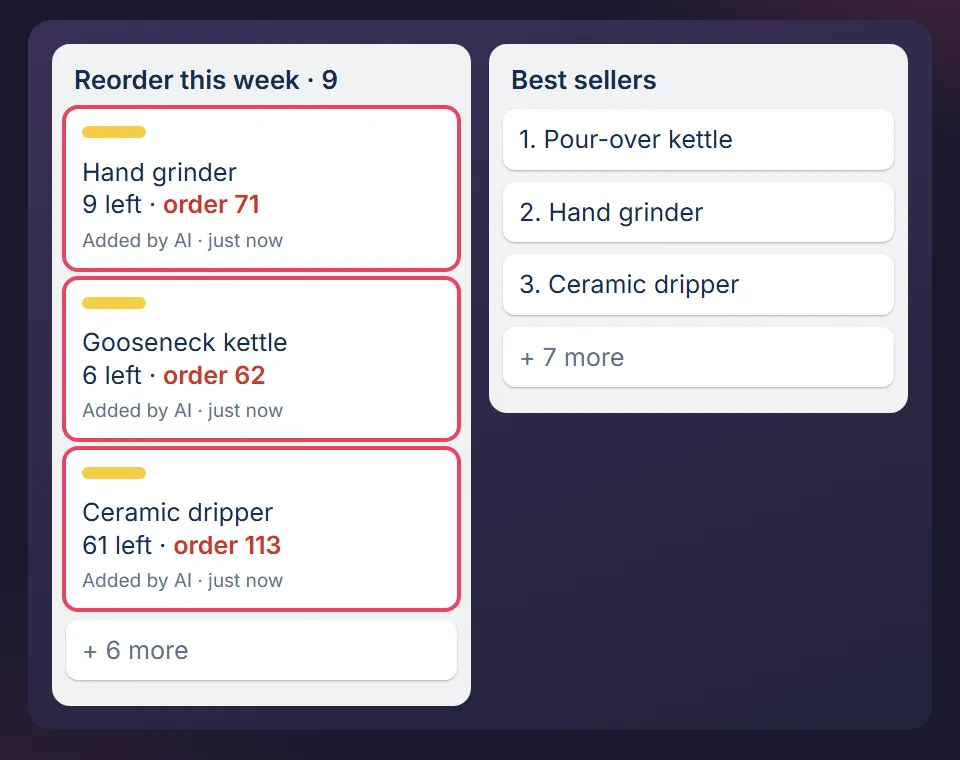
It adds cards, ticks the checklist steps it ran and logs the run. In the Monday stock check it adds one card per product that will run out before a new delivery can arrive, with the days of stock left. The number on a card is a suggestion. Placing the order stays with you, because the card says plainly that it detects and never orders.
What does Claude Code not do with Trello?
- It does not switch on Trello's repeat setting. Repeat is a switch you turn on by hand, card by card, and it cannot be set for you. It is a day one step.
- It does not work while you sleep. You open a session and it works with you, not without you.
- It does not replace your sales platform. Customer orders stay where they are.
What do I need?
- A free Trello account. The free plan is enough for the boards; limits change, so check trello.com.
- VS Code, a free editor, with the Claude Code extension, and a paid Claude plan that includes Claude Code. Claude Pro is about EUR 18 a month before VAT, paid to Anthropic.
- About two hours for the first setup in the MOGA workspace: 30 minutes to get in, then about 90 with Claude. The coding question has the steps.
Related questions
- Will Claude Code change my prices or send emails without asking?
- Do I need to code to use Claude Code for my online business?
- Claude for a small business: the 5 jobs it takes off an online seller
- One Trello board for stock, supplier orders and returns
Start with the free sample page
The free sample page shows one page of decisions with sample data: nothing sent, no signup, no Claude needed to open it.
Optional, after the sample page: the free starter board is one Trello board with sample data and the weekly stock check card, in the same format as the full boards. You can use it without Claude. Leave your email and the board link comes by email.
Want the full version? See the packs.
MOGA World is independent and not affiliated with Anthropic or Atlassian. Sample businesses and numbers on this page are invented. Questions: stef@mogaworld.co