 MOGA World
Ecommerce Workflow in Trello: Run Stock, Supplier Orders and Returns on One Board
Most people who run their own online business work from a browser with twelve tabs open: the sales platform, the supplier mails, a stock sheet, the returns inbox, a notes file. Nothing is wrong with any single tab. The trouble is that nothing tells you which one to open on a Tuesday. This article shows one Trello board that does, and the two rules that keep it working after week three.
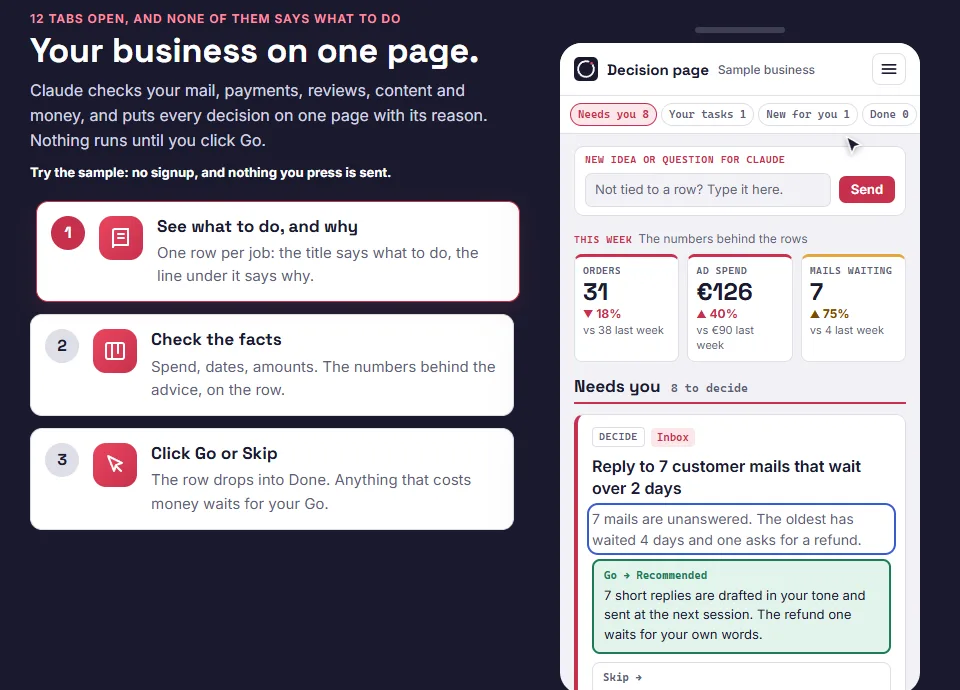
Short on time? The free sample page shows the smallest version of this workflow as one page of decisions: See the free sample page
What an ecommerce workflow is
An ecommerce workflow in Trello is one board where every recurring check is a card that stays in place, every one-off job is a card that moves across the lists until it closes, and every finding has exactly one home. The board is the schedule and the memory in one place, so you stop relying on remembering.
A word on “orders”. On this board it means the orders you place with suppliers. Your customers' orders stay in your sales platform, and the board does not replace it. It also does not run marketing or bookkeeping. It runs the operations side: stock, suppliers, listings and returns.
The lists, in order
The Operations board has nine lists, plus an Inbox at the far left for anything captured mid day that has no home yet.
- Weekly Routine: the recurring checks. Stock check, supplier chase, listing check, returns review, price review, mail sweep.
- Suppliers: one card per supplier, held as a record you read before ordering and edit after.
- Purchase Orders: one card per supplier order, moving from placed to received to paid.
- Stock Watch: products that need a decision. Empty is the healthy state.
- Listing Work: listing fixes, queued.
- Returns + Quality: one card per return pattern, never per return.
- Seasonal + Planning: dated preparation for peaks and quiet periods.
- Closed This Month: one-off jobs that are done, cleared on the first of the month.
- Start Here: the onboarding cards, deleted once you are set up.

Rule 1: a recurring card never moves
This is the rule most template boards get wrong. A recurring check lives in Weekly Routine permanently and is driven by its due date. When you finish a cycle you tick the checklist, untick it, and let the due date roll forward. It never goes to a Done list.
If you drag recurring cards through stages, you destroy your own recurring engine within a month, and an empty Done column makes you feel you are failing at work you are actually doing. Only one-off cards, such as a specific supplier order, a specific return pattern or a specific listing fix, reach Closed This Month.
One honest detail: the recurring setting on a card (in Trello, open Dates, then Recurring) has to be switched on by hand, card by card. It cannot be set through Trello's API, so no template can arrive with it already on. It is a day one step.

Rule 2: a finding lives in one place
A check card is a fixed length procedure forever. When the stock check finds a product that will run out, the finding does not get written on the check card. It becomes a card in Stock Watch with a due date. The check card only records that the check ran.
A finding that is logged on both the check card and its own card will go stale in one of them, and you will not know which. It is also why check cards grow until nobody runs them.
How stock, supplier orders and returns move through it
Stock
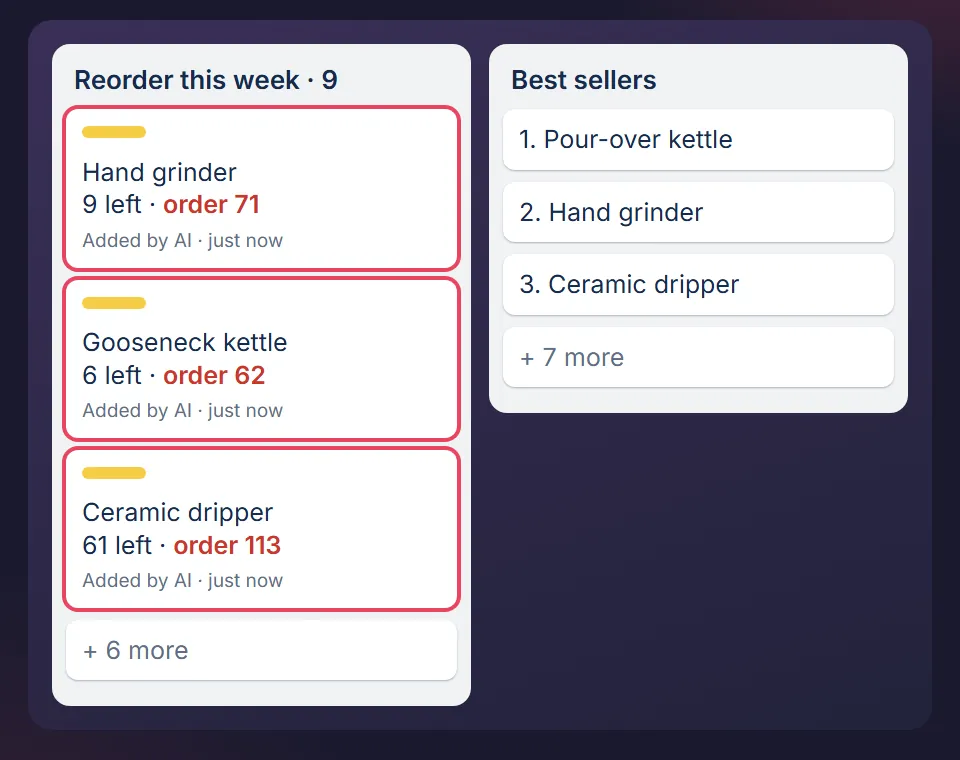
The stock check card takes 15 minutes at most. It looks for products that will hit zero before a replacement can arrive: average daily sales × the real lead time × 1.5. A product that crosses the line becomes a Stock Watch card. The check never places an order, because the order decision needs the supplier card, the minimum quantity, your packaging and your cash, and that is a separate sitting.
Supplier orders
Each order is one card in Purchase Orders, copied from a template card. The weekly chase check opens every one of them and compares its expected date with today. An order that is late and unchased stays late, because suppliers look after the customers who ask. When the delivery arrives, the receiving checklist runs: photos before opening, a carton count, a quality check on 10 units, and landed cost written down that day.
Returns
The weekly returns review ignores the individual return and hunts the repeat: 3 or more returns in 30 days with the same stated reason, or a return rate more than double your catalogue average. A pattern becomes one card in Returns + Quality, and the card ends in a prevention: the listing edit, packaging spec or order line that would have stopped it.
The rhythm: two slots a week
The board works on two fixed slots a week. In the template, one is Monday for stock and supplier orders, and the other is Thursday for listings, returns and price. Each takes 30 minutes. On the first working day of the month there is a 45 minute close that clears Closed This Month. Write your own two days on the card and put them in your calendar as a repeating event. A good intention does not survive a busy week. A calendar block does.
Two rules for the weeks that go wrong:
- If you skip a week, do the current week only. Doing two weeks of checks the next week is how people abandon the board.
- The stock check is never skipped twice in a row. Two missed stock checks is how a bestseller goes dark for a fortnight.
What you need
- A free Trello account. The free plan is enough for the boards.
- One sitting to fill in your suppliers, your 10 best selling products and a rough reorder point for each.
- Claude is optional. The board works by hand. To have Claude read it and run the checks, see Claude for a small business.
Where it stops
- It does not process customer orders. They stay in your sales platform.
- It will not fix a business with no stock, suppliers or returns to manage. Archive the cards whose trigger you do not have.
- It only works if you open it on your two days.
How I use it
I spent six years running ecommerce businesses, and this board is what was left after the same checks went wrong more than once. I rebuilt it from scratch with invented sample data, so nothing from those businesses is in it. The way MOGA itself runs on the same method is on How MOGA is run.
Start with the smallest version
The free sample page shows the stock check as one decision on a page, with sample data. The free starter board, the Trello version with the stock check card in the same format as the full Operations board, is the email step behind it.
Want the full workflow? It is in the packs.
MOGA World is independent and not affiliated with Atlassian. Sample businesses and numbers in this article are invented. Questions: stef@mogaworld.co