 MOGA World
Reorder Point Formula: When to Order, in 3 Lines and a Template
You sell something that sells every day, and twice you have looked up and found the shelf empty. The reorder point is the number that stops that: the stock level at which you place the next order. This article gives you the formula in three lines, one product worked through with every step of the arithmetic, and the mistakes that make the number wrong.
Short on time? The free sample page shows the stock check as one decision, with its reason and a Go button: See the free sample page
What the reorder point is
The reorder point is the number of units left at which you place a new order, so that the delivery arrives before you run out. Formula: reorder point = (average units sold per day × supplier lead time in days) + a buffer. When stock drops to that number, order. Not when the shelf looks thin, and not on a fixed day of the month.
It answers one question only: when. How many to order is a separate number, covered further down.
The reorder point formula in 3 lines
- Units sold per day. Total sold in the last 30 days, divided by the days you actually had stock.
- Lead time in days. From the day you place the order to the day the units are on your shelf and can be sold.
- Reorder point = line 1 × line 2, plus a buffer. The buffer covers a sales spike or a late delivery. A simple starting buffer is half of line 1 × line 2, which is the same as multiplying by 1.5.
The safety stock calculation behind the buffer has its own article: the safety stock formula. Until you have read it, the 1.5 multiplier is a workable place to start.
A worked example, step by step
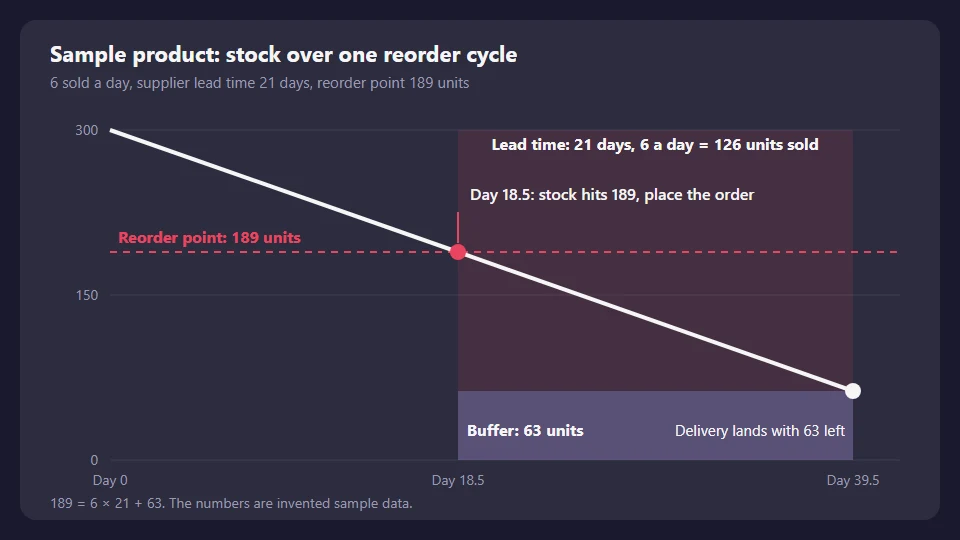
Sample product, invented numbers. You sold 180 units in the last 30 days, and the product was in stock on all 30 days. The supplier takes 21 days from order to your shelf.
| Step | Arithmetic | Result |
|---|---|---|
| 1. Sold per day | 180 ÷ 30 | 6 units a day |
| 2. Sold during the lead time | 6 × 21 | 126 units |
| 3. Buffer, half of step 2 | 126 × 0.5 | 63 units |
| Reorder point | 126 + 63 (or 6 × 21 × 1.5) | 189 units |
Read it as a timeline. Stock falls by 6 a day. At 189 you place the order. Over the next 21 days you sell 126 units, so the delivery lands with 63 left. The buffer is what is still on the shelf when the truck arrives.
What happens if you order at 50 instead of 189
Ordering at 50 units leaves you out of stock for about 13 days on this product. At 6 a day, 50 units last 50 ÷ 6 = 8 days. The delivery takes 21 days. 21 minus 8 is 13 days with nothing to sell.
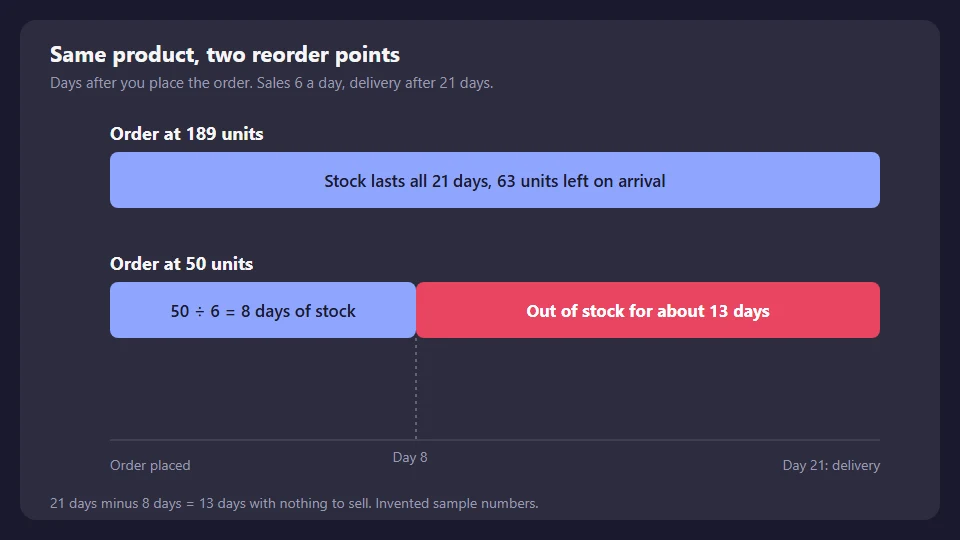
Ordering at 50 feels safe when you look at the shelf, because 50 units still looks like plenty. The shelf does not show the 21 days between the order and the delivery. The formula does.
Which numbers to use, so the result is not wrong
The formula is simple. The inputs are where it goes wrong.
- Use the last three real lead times, not the quoted one. A supplier who says 14 days and delivered in 19, 24 and 17 gives you a lead time of 20. Take the average of what happened, from order date to sellable date.
- Count only the days you had stock. If you were out of stock for 10 of the last 30 days, divide the units sold by 20, not 30. Days at zero make demand look lower than it is, and the product then runs out again.
- Take promo weeks out, or label them. A sale week is not a normal week. Use a normal 30 day window, or a separate number for the promo.
- Count sellable stock only. Damaged, reserved and returned units still being checked are not on the shelf for a buyer.
- Lead time includes your side. Time to place the order, receive the cartons, count them and list the units all belong to it.
Already below your number today? Order now. You cannot get the missing days back, but every day you wait adds one more day without stock. If a supplier is new and you have no real lead times yet, use their quote plus 30 percent until you have three.
Reorder point versus order quantity
The reorder point says when to order. The order quantity says how many. A common starting quantity is the sales of the next full cycle: 6 a day × the days you want one order to last, minus what will still be on the shelf on arrival. Your supplier’s minimum order can override it.
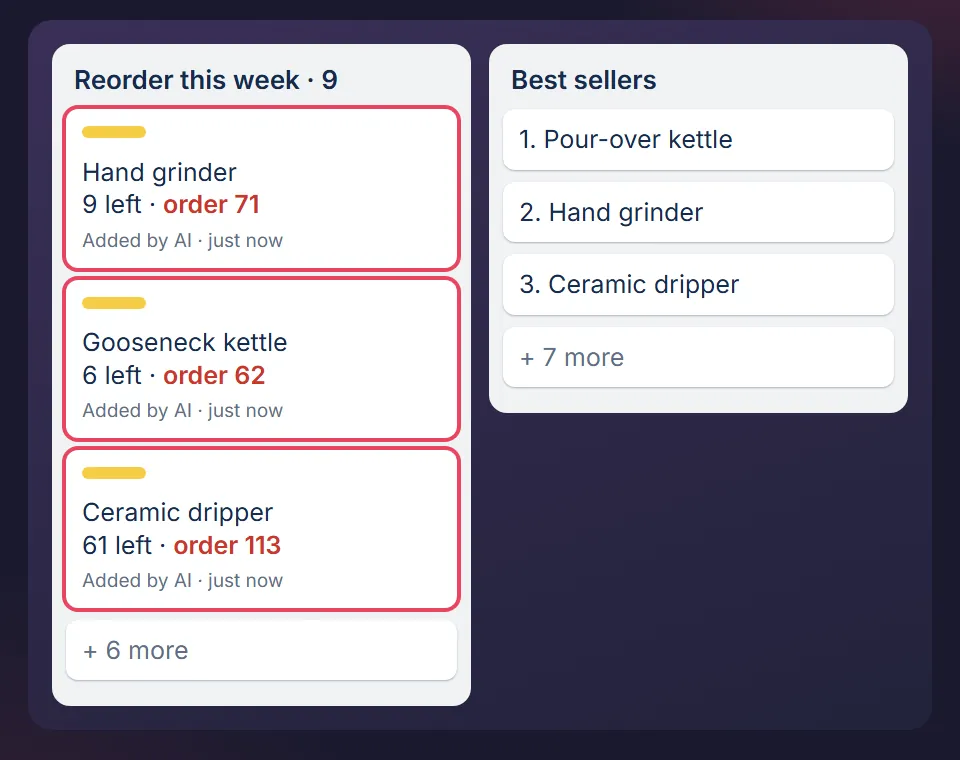
A weekly stock check is where both numbers get used: for each product, compare units left to its reorder point, and write a card for every product that is at or below it.
When to recalculate
- Every month, for your 10 best selling products. Sales per day moves more than you think.
- When a supplier is late twice in a row. Your lead time just changed, whatever the quote says.
- Before a season, using last year’s sales per day for that season, not this month’s.
- When you change supplier, because every number on the line is new.
A reorder point template you can copy
One row per product is enough. Three numbers you fill in, one the sheet works out.
| Product | Sold in 30 days | Days in stock | Lead time (days) | Reorder point | Rule |
|---|---|---|---|---|---|
| Sample product | 180 | 30 | 21 | 180 ÷ 30 × 21 × 1.5 = 189 | Order when units left is 189 or less |
In a spreadsheet the reorder point cell is =B2/C2*D2*1.5. On the Operations board the same rule sits on the stock check card, so a product at or below its number becomes a card with a due date. A card without a due date does not get done, which is why the check creates them with one.
Where it stops
- It assumes sales are fairly steady. For a product that sells 40 one week and 2 the next, the buffer needs more than half, and the safety stock article is where to look.
- It does not tell you whether a product is worth stocking. It checks one you already sell.
- The numbers here are samples. Replace them with yours, from your own last 30 days.
How I use it
I spent six years running ecommerce businesses, and a stockout on a best seller taught me the lead time lesson faster than any article. The rule above is the one the stock check on my own boards uses. How I run MOGA with the same method is on How MOGA is run, and the other five weekly procedures are in the ecommerce SOP template article.
See the stock check as one decision, free
The free sample page shows a stock check as one decision with its reason and a Go button. No signup, and nothing you press is sent. The free starter board, the Trello version with the stock check card, is the email step behind it.
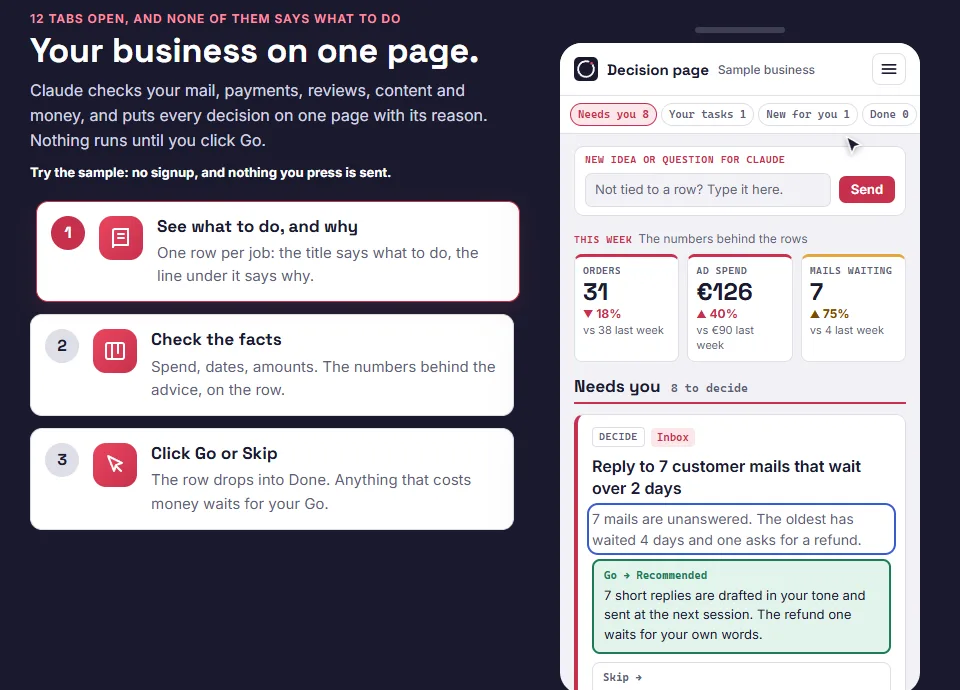
Want the whole weekly routine? It is in the packs. If you want Claude to run the check for you, this article shows how.
MOGA World is independent and not affiliated with Anthropic or Atlassian. Sample businesses and numbers in this article are invented. Questions: stef@mogaworld.co